Push Alert or Email Bulletin: Two Different Kinds of First Read
Push alert or email bulletin: choose the format that suits your attention, from a brief interruption to a considered catch-up you can revisit.
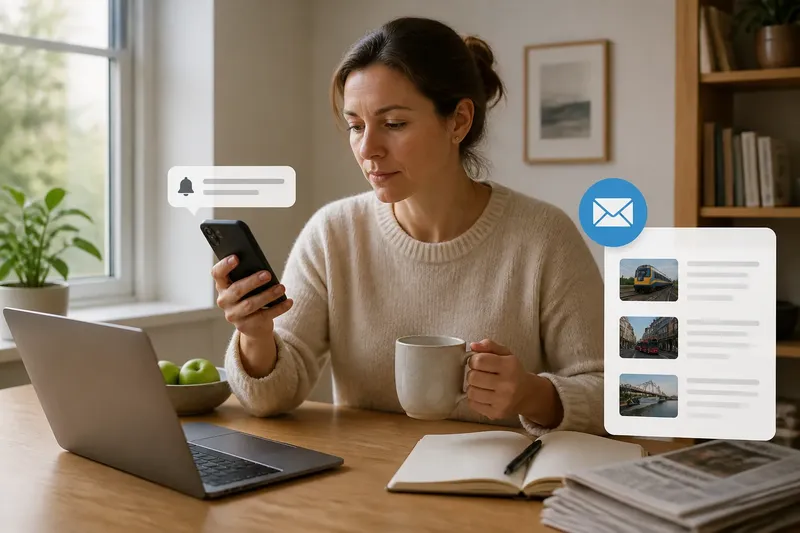
Your phone lights up as you carry groceries: a push alert says a transport service has stopped, but offers no explanation. Later, an email bulletin sets out several related updates in one message. A push alert or email bulletin serves a different reading moment: one interrupts you with a prompt, while the other invites you to sit down and catch up.
The useful question is not which format is more complete. It is which one fits your attention, your inbox habits and the way you want a news service to reach you. Those choices can make the difference between a useful nudge and another message you ignore.
What is a push alert good for?
A push alert is designed to catch your eye outside the publication’s app or website. It can make you aware of a new development when you are doing something else, then offer a link if you want to read more.
That interruption is useful when you want a prompt without having to check a site yourself. It is less suited to a quiet reading session: a short notification may arrive while you are on a bus, in a meeting or carrying shopping, with no convenient way to follow the link.
Consider the alert a doorbell, not a conversation. You can decide whether to answer now, leave it until later or silence the doorbell when you need uninterrupted time.
What does an email bulletin do differently?
An email bulletin waits in your inbox until you choose to open it. It may group related stories or updates, making it useful for a planned catch-up rather than an immediate interruption.
Email also gives you a familiar place to find the message again, though it can be buried among other mail. If you read news in batches, a bulletin can fit neatly into that routine; if your inbox already feels crowded, another scheduled message may be easy to miss.
The format does not decide how much attention a story deserves. A bulletin can be brief, and an alert can point to a detailed report. Choose based on when and how you want the publication to reach you, not on an assumption that one format is inherently more thorough.
How do you choose the right format for your routine?
Start with the kind of interruption you welcome. If you want immediate prompts about selected subjects, consider alerts. If you prefer to open a collection of news at a time you choose, try a bulletin. You can also use both for different purposes, or neither if you prefer to visit the publication directly.
- You want prompts about a particular subject: check whether the app offers topic-specific alerts; if it does, enable the relevant category, and if it does not, use a bulletin or visit the topic page instead.
- Your phone interrupts you at awkward moments: check the app’s notification categories; if you can select only the alerts you want, narrow them, and if you cannot, mute the app or use your device’s focus settings.
- You prefer a planned reading time: check whether the publication offers a bulletin that suits your interests; if it does, subscribe and set aside a convenient time to read it, and if it does not, bookmark its news page for your own catch-up.
- Your inbox is already difficult to manage: check whether the bulletin can arrive less often or cover fewer subjects; if it can, change those settings, and if it cannot, unsubscribe and use the publication’s site or app instead.
- You want to return to a message: check whether the alert links to a page you can bookmark or the bulletin can be kept in a folder; if so, save that destination, and if not, note the publication and subject so you can search for it later.
- You are unsure whether an alert is useful: check whether it repeatedly brings information you want at that moment; if it does, keep that alert category, and if it does not, switch it off and consider a bulletin for a less interruptive update.
How can you set up a useful mix?
Say you want to follow local transport news but dislike phone interruptions during work. Imagine your news app offers topic controls and your local publication sends an email bulletin. You turn off general push notifications, keep the transport category silent or disabled, and subscribe to the local bulletin. The result is a planned email catch-up rather than a phone prompt; the trade-off is that you may not see a new message until you open your inbox.
If that trade-off does not suit you, change one setting at a time. For instance, you could turn on transport alerts while leaving other categories off, then decide whether the interruption fits your routine. Use the app’s own controls and your phone’s notification settings; available options differ by service and device.
Which format questions do readers ask?
Can I switch off some push alerts but keep others?
Many news apps separate alert categories, though the options vary. Open the app’s notification settings and keep only the subjects you want to receive; if there are no category controls, your phone may let you mute the app as a whole.
How do I stop a bulletin arriving in my inbox?
Use the unsubscribe link in the email or change your preferences through the publication’s account settings. If you still want its news, visit the site or app when you choose instead of receiving the message.
Can I receive both alerts and a bulletin?
Yes, if the publication offers both. Keep alerts for the subjects you want to notice promptly and use the bulletin for a separate catch-up; if they feel repetitive, remove the overlapping alert or unsubscribe from the bulletin.
What if I cannot find notification settings?
Check the app’s account or settings menu, then your phone’s system settings for that app. If neither offers the control you need, contact the publication’s support team or turn off notifications for the app on your device.
How should you revisit a message?
For a message you want to keep, save the linked page or move the email into a folder you can find later. A dismissed alert may be hard to retrieve, while a message left in a busy inbox can disappear from view; a saved link gives you a clearer route back.
When choosing a push alert or email bulletin, focus on the way you want to receive news: a brief interruption or a message that waits for you. If neither fits, visit the publication directly and read on your own schedule. A small change to your settings can make the format serve your routine rather than compete with it.